Lumaspec-rt analysis software
- Technology
- Monitoring systems
- Partner
- Advanced Energy
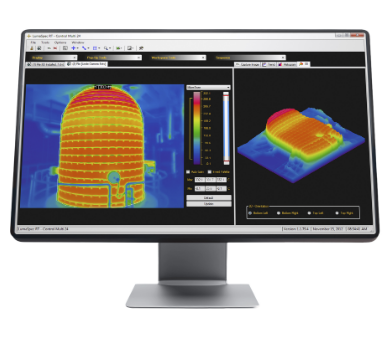
LumaSpec RT is a Windows-based software range designed for live thermal image acquisition, process monitoring and post-processing. It connects compatible thermal cameras and pyrometers to a desktop, laptop or networked workstation, allowing engineers to review snapshots, live feeds, recorded sequences and temperature profiles. The available toolset covers ROI measurements, histograms, isotherms, 3D profiles, trend charts and hot and cold spot detection, with support for up to 32 ROIs per camera.
Depending on the selected package, the software can be configured for standalone use or simultaneous operation with as many as 24 cameras. OPC, Modbus and physical I/O options allow calculated data, alarms and triggers to be exchanged with a DCS, PLC or data historian. Typical applications include process control, equipment monitoring, quality checks and anomaly detection in metal processing, glass production, continuous casting, slab burr detection and forging.
Range features
A high level overview of what this range offers
- Real-time image acquisition and display: Captures thermal snapshots, live feeds, image sequences and video for immediate review and later analysis.
- Multi-camera operation with up to 24 inputs: Supports standalone stations and networked monitoring systems, depending on the selected package.
- Up to 32 ROIs per camera: Measures point, line and area regions using minimum, maximum, average and standard-deviation values.
- Thermal analysis tools: Histograms, isotherms, profiles, trends and hot and cold spot tools help characterise temperature behaviour over position and time.
- Adjustable camera and image parameters: Remote focus, camera speed, uniformity correction, emissivity, background, transmission, palettes and auto-gain support controlled setup.
- Alarm logic and computation channels: Combines ROI conditions using AND/OR logic and monitors relationships between selected points or regions.
- OPC, Modbus and physical I/O: Exchanges processed data, alarms and triggers with DCS, PLC and historian systems; optional interface modules may be required.
- Normal and alarm archiving: Uses separate recording rates and pre-buffered trigger logging to retain relevant event data.
- Data export in established formats: Saves images, video and measurement data for external analysis, reporting and process records.
- Automatic restart and configuration recovery: Reconnects cameras and reloads saved analysis, alarm and communication settings following an unplanned host shutdown.
Downloads
for Lumaspec-rt analysis software
What’s in this range?
All the variants in the range and a comparison of what they offer
Specifications
| Parameter | Specification |
|---|---|
Product type | Windows-based real-time thermal imaging data acquisition and analysis software |
Software packages | Viewer, Basic, Analyzer, Analyzer Multi 6, Control, Control Multi 6, Control Multi 12 and Control Multi 24 |
Host operating system | 32-bit or 64-bit Windows |
System configurations | Standalone direct-Ethernet installation or multiple-camera network through switches |
Maximum camera capacity | Up to 24 simultaneous cameras or sequences, depending on package |
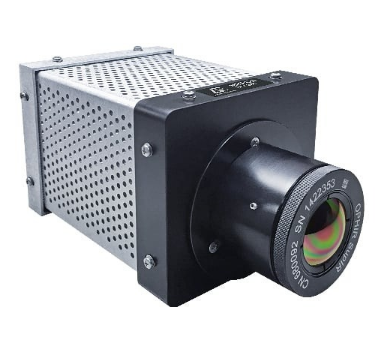
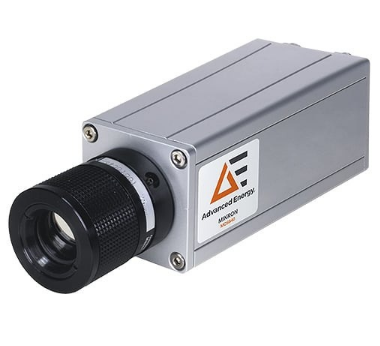
Compatible thermal cameras | MCS640, MC320 and MCL640 |
ROI capacity | Up to 32 ROIs per camera |
ROI types | Point, line, area and other selectable region types |
ROI statistics | Minimum, maximum, average and standard deviation using the pixels within the ROI |
Analysis functions | Histogram, isotherms, line profile, orthogonal X-Y profile, 3D profile, trends, hot and cold spot detection and image subtraction |
Camera and image adjustment | Remote focus, speed, uniformity correction, frame rate, emissivity, background, transmission, palettes, span, range and auto-gain |
Additional camera functions | MCS640 auto-range switching, pan-and-tilt control, thermal and visual camera support, pyrometer integration and scene registration; availability depends on package |
Alarm functions | ROI alarms, on-screen alerts, optional digital outputs, AND/OR logic and computation channels |
Automation protocols | OPC and Modbus, including serial and Ethernet Modbus |
Physical I/O | Relay and analogue output support through I/O modules; external physical inputs supported |
Triggering | ROI, alarm, OPC, Modbus and physical I/O trigger options with pre-buffer memory |
Archiving | Normal and alarm recording rates, error logs, image capture, video capture, ROI data archiving and trigger pre-buffering |
Web monitoring | Web page server support |
Image output | JPG and BMP |
Video output | AVI |
Measurement-data export | Excel, text and CSV |
Access and configuration | Password-controlled access, user profiles, camera auto-start, automatic restart and saved configuration loading |
Minimum processor | Dual-core 1.5 GHz or faster |
Minimum system memory | 4 GB RAM |
Minimum graphics | Dedicated graphics card with 1 GB of 900 MHz DDR3 dedicated memory |
Minimum storage hardware | 7200 rpm hard drive with 16 MB buffer and 3.0 GB/s SATA bus |
Minimum network interface | Gigabit Ethernet supporting jumbo packets up to 9014 bytes |
Delivery medium | DVD containing the software and PDF documentation |
Variant and Reference Number Table
| Specification | Viewer | Basic | Analyzer | Analyzer Multi 6 | Control | Control Multi 6 | Control Multi 12 | Control Multi 24 |
|---|---|---|---|---|---|---|---|---|
Reference number | 812-0008-01 | 812-0009-01 | 812-0029-01 | 812-0029-06 | 812-0030-01 | 812-0030-06 | 812-0030-12 | 812-0030-24 |
Maximum simultaneous cameras stated in package name | Not stated | Not stated | Not stated | 6 | Not stated | 6 | 12 | 24 |
The numbered Multi designation identifies the maximum number of cameras that can be connected simultaneously with that package.
FAQs
for Lumaspec-rt analysis software
Begin with the required camera count and then check whether the application needs live viewing, quantitative analysis, automated alarms, archiving or plant-control functions. The range includes Viewer, Basic, Analyzer and Control packages, with Analyzer Multi 6 and Control Multi versions for 6, 12 or 24 simultaneous cameras. The numbered Multi designation gives the maximum simultaneous camera count for that package, while the standard package names do not state a numbered multi-camera limit. Function availability also differs between package levels, so communications, alarm and data-handling requirements should be confirmed before ordering. This prevents a system from meeting the camera-count requirement but lacking the required analysis or automation functions.
LumaSpec RT is designed for a 32-bit or 64-bit Windows computer with at least a dual-core 1.5 GHz processor and 4 GB RAM. The minimum graphics requirement is a dedicated card with 1 GB of 900 MHz DDR3 dedicated memory, while storage is listed as a 7200 rpm hard drive with a 16 MB buffer on a 3.0 GB/s SATA bus. The network interface must be Gigabit Ethernet and support jumbo packets up to 9014 bytes. These values establish a minimum operating baseline rather than a storage-retention calculation. For multi-camera recording, the workstation and storage plan should therefore be sized against the selected cameras, frame rates, archive duration and alarm-recording policy.
All package versions are compatible with MCS640, MC320 and MCL640 thermal cameras, and the software also supports pyrometer integration. A standalone installation can connect a camera and pyrometers directly to a Windows desktop or laptop over Ethernet. Larger systems can place multiple instruments on a common or dedicated network through switches, with programmable output devices connected where required. The selected Multi package sets the simultaneous camera ceiling, up to 24 cameras for Control Multi 24. During design, engineers should check network capacity, jumbo-packet support and the required I/O architecture rather than treating each camera connection as an isolated point-to-point link.
Integration can be implemented through OPC, Modbus or physical I/O, depending on the selected software package and optional interface modules. Modbus support covers serial and Ethernet connections, while physical I/O can include relays and analogue outputs. Inputs may originate from image-analysis conditions, OPC, Modbus or physical I/O, and processed results or alarms can be returned to a DCS or PLC. This arrangement supports monitoring, supervisory logic and closed-loop control where the plant system makes the final control decision. Engineers should define signal direction, update requirements, alarm latching and fail-safe behaviour during system design, because protocol support alone does not determine the control philosophy.
Each camera can process up to 32 ROIs, with point, line and area region types available for temperature display. ROI calculations can include minimum, maximum, average and standard-deviation values derived from the pixels within the selected region. Additional tools include histograms, isotherms, line profiles, orthogonal X-Y profiles, 3D profiles, trend charts and hot and cold spot detection. Alarm conditions can be combined with AND/OR logic, while computation channels can evaluate relationships between selected regions or points. In practice, this allows an engineer to trigger on a meaningful thermal pattern rather than relying on a single temperature value at one location.
Thermal records can be stored at different rates for normal and alarm conditions, and pre-buffered trigger logging can retain data from before an event. Images can be saved as JPG or BMP, recorded thermal video can be exported as AVI, and measurement data can be sent to Excel or text and CSV files. This combination supports event review, process documentation and external reporting without limiting analysis to the live workstation. No fixed archive capacity or retention period is stated, so those values depend on the host storage and the chosen recording policy. Storage calculations should include camera count, frame rate, alarm frequency, pre-buffer duration and the required retention period.
Automatic restart is intended for monitoring systems that must recover after an unplanned PC or server shutdown. When configured, the software can start, reconnect to cameras and load saved settings for frame rate, ROIs, analysis tools, alarms and communications. This reduces the amount of manual reconfiguration needed before thermal monitoring resumes. The function is particularly relevant to unattended multi-camera installations and process-safety applications where a stopped workstation would create a monitoring gap. It should still be combined with suitable power protection, host operating-system management and alarm handling for cases where the workstation or network cannot recover automatically.