LM4 out-of-band console server solution
- Technology
- Routers, gateways, modems and switches
- Partner
- Lantronix
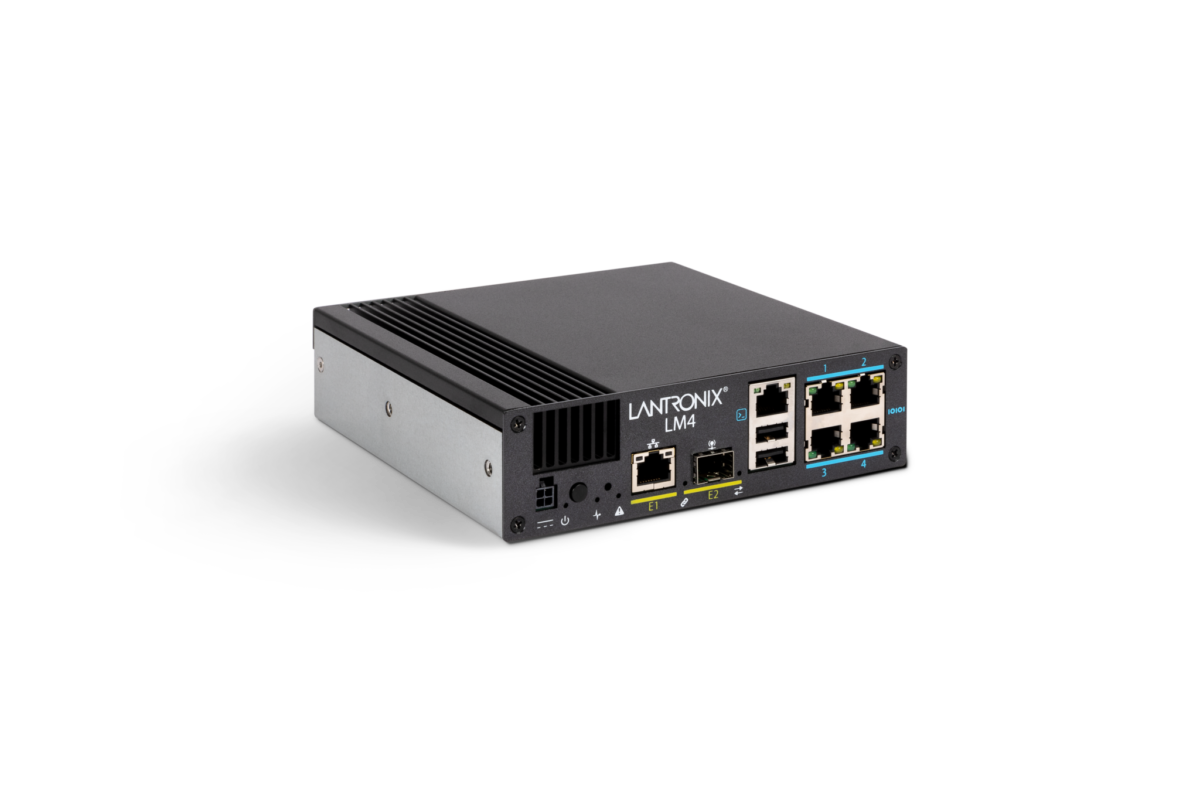
The LM4 is a small-form-factor out-of-band management console server purpose-built for managing critical IT infrastructure at branch sites and network closets. It offers resilient access to routers, switches, servers and other devices whether the main network is operational or not. By hosting an onboard management OS (LMOS) with local processing and storage, the LM4 can continuously monitor connected equipment and automatically remediate issues without requiring on-site intervention. Typical deployments range from intermediate distribution frame (IDF) closets and remote offices to unmanned kiosks and edge data centres, bringing advanced monitoring and control to locations previously considered too small for dedicated OOB solutions.
The LM4 supports up to four direct serial console connections (for RS-232 management ports) along with another 48 virtual console ports over IP, allowing one unit to oversee dozens of devices. Network engineers in high-security and high-uptime environments (finance, healthcare, utilities, defence and more) can rely on the LM4’s secure design, which includes encrypted local storage and compliance logging, to meet corporate governance standards. When managing multiple sites, an optional centralised Control Centre platform can be used to unify and automate tasks across all LM-series console servers. In short, the LM4 brings enterprise-level network resilience and automation to small sites, helping organisations reduce downtime and maintenance costs through smarter out-of-band management.
Range features
A high level overview of what this range offers
- Resilient out-of-band connectivity – Maintains management access to equipment even during network outages, ensuring you can reach and fix devices when the primary link is down.
- Compact 1U design (approx. 158 × 158 mm) – Small footprint hardware fits neatly into crowded cabinets and branch office racks, making it ideal for IDF closets and remote locations with limited space.
- Multi-port console access – Provides up to 4 physical RJ45 serial console ports (RS-232) plus support for 48 virtual ports, allowing one LM4 to manage many devices simultaneously both on-site and over network links.
- Onboard LMOS software – Embedded management OS with local processing and 16 GB encrypted flash storage enables script-free automation, data logging, and intelligent control at the network’s edge without needing an external server.
- Automated recovery & rollback – Intelligent rule-based automation can detect unresponsive or misconfigured network devices and automatically restore them (e.g. rebooting gear stuck in ROMmon mode or rolling back to last-known-good configurations) to minimise downtime.
- Secure & compliant operation – Features built-in hardware security such as 256-bit AES encryption for stored configurations and logs, plus robust user authentication and audit trails, helping meet cybersecurity and compliance requirements for sensitive environments.
- Central management capable – Integrates with an optional centralised management platform (Control Center software) for a single-pane-of-glass view, enabling bulk device management, uniform policy enforcement, and detailed compliance reporting across multiple LM4 units.
- Zero-touch deployment – Supports zero-touch provisioning so units can automatically fetch configurations and updates on install, simplifying large-scale rollouts by reducing the need for on-site setup.
Downloads
for LM4 out-of-band console server solution
What’s in this range?
All the variants in the range and a comparison of what they offer
System
| Specification | Details |
|---|---|
Management interfaces | Supports up to 4 × RS-232 serial console ports; 1 × Gigabit Ethernet (10/100/1000Base-T); 1 × RS-232 local console port; 1 × 1 Gbps SFP network port |
On-board storage | 16 GB eMMC flash memory (TCG Opal 2.0, AES-256 encryption for data at rest) |
Peripheral ports | 2 × USB Type-A (for peripherals or backup connectivity, e.g. USB modem) |
Dimensions & Weight
| Specification | Details |
|---|---|
Dimensions (H × W × D) | 44.45 mm × 158.75 mm × 158.75 mm (1.75″ × 6.25″ × 6.25″) |
Weight | 1.42 kg (3.13 lbs) |
Power & Environmental
| Specification | Details |
|---|---|
DC input range | 9 – 60 V DC (direct input to unit) |
Power consumption | < 24 W (typical operation) |
AC power adapter | External AC/DC adapter included (AC input 100–240 V, 50–60 Hz; DC output 12 V DC, 3 A) |
Operating temperature | 0 °C to 55 °C (32 °F to 131 °F), 10%–90% relative humidity (non-condensing) |
Storage temperature | -30 °C to 60 °C (-22 °F to 140 °F), 5%–95% relative humidity (non-condensing) |
Included Accessories
| Specification | Details |
|---|---|
In the box | Console server unit, AC power supply with regional power cord, 2 m Cat5e RJ45 console cable, rack-mount ear bracket and screws, quick-start guide |
Warranty
| Specification | Details |
|---|---|
Standard warranty | 1 year hardware warranty |
FAQs
for LM4 out-of-band console server solution
The LM4 is designed for out-of-band connectivity, meaning you can reach it (and the devices attached to it) via an alternate path if the main network is unavailable. Typically, the LM4 connects to devices through serial console ports and can be accessed through a secondary network interface or modem. In practice, an admin might use a dedicated management network, an analog phone line, or a cellular modem (via the USB port) attached to the LM4 to remotely log in. This separate channel lets you troubleshoot and control equipment through the LM4 even if the site’s primary LAN or WAN is offline.
LMOS is the specialised operating system running on the LM4 console server. It provides the web interface and CLI for managing the LM4 itself and all connected devices. More importantly, LMOS enables local intelligence: it continuously monitors consoles for predefined events and can execute automated “playbooks” (actions) when certain conditions are met. For example, if a router drops into a bootloader prompt, LMOS can detect that and initiate a recovery sequence. In short, LMOS powers the LM4’s automation, data logging, security features, and overall device control capabilities.
It depends on the model and connection type. Physically, the LM4 comes in models with either 2 or 4 serial console ports, so it can directly attach to up to four pieces of equipment via RJ45 serial cables. In addition, the LM4 supports up to 48 virtual console sessions over the network. Virtual ports allow the LM4 to manage devices that are not directly plugged into its serial ports. In total, you could be managing dozens of devices concurrently: up to 4 via direct serial connections and many more over virtual connections.
Virtual console ports are software-defined serial ports that use network connections instead of physical serial cables. Essentially, the LM4 can act as an intermediary to connect to devices over IP as if they were local serial connections. For instance, you might have a network switch that is accessible via Telnet/SSH; the LM4 can present that connection as a virtual serial port session. This means you can centralise and secure even network-accessible console ports through the LM4’s interface. Virtual ports greatly expand the number of devices one LM4 unit can manage and provide flexibility to reach equipment that isn’t directly wired into the LM4.
Yes, the LM4 includes automation features that can proactively remediate common issues with connected devices. Using its rules-based engine, the LM4 monitors console output for signs of problems. For example, if a router crashes into ROMmon mode (bootloader) or a device becomes unresponsive after a bad configuration, the LM4 can step in. It is capable of restarting the device and even reloading a saved configuration or firmware image that it had previously archived. Additionally, the LM4 can keep a library of recent configuration files (and multiple OS images) for each managed device – if a configuration change causes trouble, it can automatically roll back to the last known good config. These automated recovery processes mean many network hiccups can be corrected by the LM4 instantly, without waiting for an engineer to travel on-site.
The LM4 is built with security in mind since it often sits in sensitive network segments. Firstly, all access to the LM4’s management interface can be locked down with encryption (for example, using HTTPS and SSH for remote access) and supports authentication methods like keys or multi-factor authentication as configured. The device’s on-board storage (16 GB flash) is self-encrypting (meeting TCG Opal 2.0 standards), so any logs, configurations, or credentials stored on the LM4 are protected even if the unit is stolen or tampered with. The LM4 also maintains detailed audit logs of user actions and device events, which helps with compliance requirements. Overall, it provides enterprise-grade security features – but it’s also important for administrators to integrate it into their security policies (for instance, changing default passwords, updating firmware regularly, and so on).
Yes. For deployments with many out-of-band consoles, a centralised management platform is available to streamline operations. The manufacturer provides a software called Control Center (installed on-premises or in the cloud) which serves as a single interface to oversee all LM-series console servers in your network. Through this central console, you can monitor the status of dozens or hundreds of LM4 devices, push firmware updates, set global rules/policies, and aggregate logs for compliance reporting. Essentially, it gives you “single pane of glass” management – rather than logging into each LM4 individually, you manage everything from the Control Center dashboard. This is especially useful in large enterprises or MSP environments where consistency and oversight are key.
The LM4 console server is shipped as a complete kit with all necessary accessories to get started. In the box, you will find the LM4 unit itself, its power supply (with the appropriate AC power cord for your region), and a Cat5e RJ45 serial console cable for connecting to a device’s console port. It also includes a rack mount ear kit (a bracket and screws) so you can secure the LM4 in a standard 19-inch equipment rack or cabinet. Finally, a printed Quick Start Guide is provided to help with initial setup. Essentially, you don’t need to purchase any special cables or adapters separately – everything needed for a basic installation is included.
All LM4 devices share the same core functionality and form factor, but there are a few variants to accommodate different needs and regions. The primary difference is the number of serial ports: you can choose between a 2-port model or a 4-port model. The 4-port LM4 has four RJ45 serial console interfaces, whereas the 2-port LM4 has two (and a blanking panel where the others would be). Internally, both models support the same 48 virtual ports and features. Additionally, each model is available in regional versions such as -NA, -UK, or -EU, which simply refer to the type of power adapter and cord included (North American, UK, or European mains plug). For example, “LM4-4S-UK” denotes a 4-port LM4 with a UK power cord. Aside from the port count and power plug, all versions have identical specifications and capabilities.
The LM4 is designed for indoor use in typical IT environments like data centres, server rooms, or network closets. It operates in a temperature range of 0 °C to 55 °C (32 °F to 131 °F) with 10%–90% relative humidity (non-condensing). This covers normal room-temperature conditions; however, it’s not hardened for extreme cold or hot outdoor enclosures, so you’d keep it in climate-controlled areas. When the LM4 is powered via AC, you use the supplied adapter (100–240 V AC input). It can also run on DC power (9–60 V DC input range) if you need to draw from a telecom DC bus or battery plant – this flexibility is handy for mobile and industrial installations. Always ensure the LM4 is mounted in a dry, dust-free location and has adequate ventilation, just as you would for any network equipment, to maintain reliability.