Accessory for Goniophotometers – Lightinterface
- Technology
- Goniophotometer and spectroradiometer
- Partner
- Viso Systems
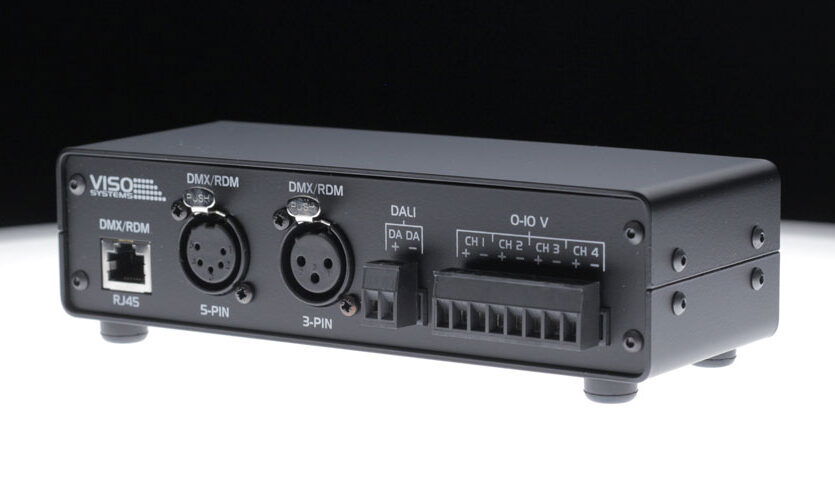
LightInterface is an innovative accessory for goniophotometer systems designed to simplify and speed up the testing of controllable light sources. It enables laboratory and R&D teams to measure lamps and luminaires under various dimming and colour-tuning conditions without manual intervention. By connecting this compact module between your light measurement system and the luminaire’s control inputs, you can program sequences of DALI commands, DMX/RDM settings, or analogue 0-10V dimming levels. The Light Inspector software (included for free) recognises the LightInterface device and lets you create automated test routines, capturing full photometric data (lumen output, colour metrics, efficacy, etc.) for each setting. This means you can determine, for example, which dimming level yields the highest efficacy, how colour tuning affects CRI, or whether certain settings introduce flicker – all in one comprehensive test. The LightInterface module is ideal for lighting manufacturers, testing laboratories and engineers in general or entertainment lighting fields who need a reliable way to assess performance across multiple control scenarios.
Range features
A high level overview of what this range offers
- Automated multi-level testing – Program custom sequences of dimming or colour changes (DALI, DMX or 0-10V) and let the system run through them automatically, saving significant time over manual re-testing.
- Supports DALI, DMX/RDM and 0-10V – Handles all common wired lighting control protocols, so you can test smart luminaires and drivers regardless of whether they use digital (DALI/DMX) or analogue (0-10V) control. This broad compatibility means one device covers many fixture types.
- Integrated with measurement software – Seamless integration with the Light Inspector software provides an intuitive interface to set up control profiles and triggers. The software logs every measurement under each control setting, enabling easy comparison and analysis of results in real time.
- Combined results in one file – LightInterface ensures that photometric data from all tested settings are saved in a single report. You can directly generate comprehensive PDFs or Excel reports showing how lumen output, colour temperature, CRI, efficacy, or flicker performance vary with each control level – ideal for in-depth performance evaluation.
- Enhanced insight into performance – By measuring light output in dimmed or colour-tuned stages, it allows engineers to identify optimal settings for energy efficiency and colour quality, and detect any problematic settings (e.g. those causing high flicker or colour shift). This leads to better-informed product design and quality control.
- Rugged, plug-and-play design – The module features a powder-coated steel housing for durability. It connects to your PC via a single USB cable for both power and data, with no separate power supply needed in normal use. Simply plug it in, and the system is ready to control and measure.
- Universal compatibility – Designed to work with all existing goniospectrometer systems in the lineup (e.g. LabSpion®, BaseSpion®, LightSpion®), it protects your investment by adding new capabilities to your current light measurement equipment. Whether you have a compact or large goniophotometer setup, LightInterface integrates smoothly to extend its functionality.
What’s in this range?
All the variants in the range and a comparison of what they offer
| Specification | Details |
|---|---|
Supported Protocols |
|
Software Integration | Works with free Light Inspector PC software (with added control-sequence features). Also supports integrating wireless-controlled lamps in semi-manual mode for testing. |
Physical Data | Powder-coated steel enclosure; dimensions 180 mm × 75 mm × 52 mm. Weight: approx. 600 g (device only), plus 2 m USB-B to USB-A cable included. |
Power & Connectivity | USB-powered device (no external supply needed under normal operation). Single USB connection to PC provides both power and data communication. (Optional 24V input is available for specific use cases, though not required for typical testing.) |
FAQs
for Accessory for Goniophotometers – Lightinterface
Traditionally, measuring a lamp at multiple dimming levels or colour settings meant manually changing the setting and taking a new measurement for each one. LightInterface automates this process. You can program a sequence of control steps (e.g. various DALI dimming levels or DMX scenes) in the software. The system will then automatically run the goniophotometer measurement for each step in turn. This not only saves a huge amount of time but also ensures consistency between measurements, since every run is performed under identical conditions and without human error. The result is a single combined data set covering all the specified settings, which is far more efficient and reliable than one-by-one manual testing.
LightInterface supports all major wired control signal types used in modern luminaires. This includes DMX512 (with RDM) for stage/entertainment lighting, DALI (including DALI-2) for architectural and commercial lighting control, and traditional 0–10 V or 1–10 V analogue dimming. In practice, this means you can connect and test fixtures that respond to DMX commands (including RDM feedback), DALI ballasts or drivers, as well as any lights that dim via 0-10 V control voltage. Up to 512 DMX channels are available, and up to 4 channels for 0-10 V outputs, covering multi-channel LED luminaires (for example, tunable white or RGBW fixtures).
In normal operation, no external supply is needed – the LightInterface draws all necessary power via the USB connection to your PC. It is designed to source the required current for typical DALI or 0-10 V control signals directly. The device does include a 24 V DC input jack as an option if you need to power a larger DALI network or other specialty scenario, but for the majority of use cases this won’t be required. The inclusion of the optional jack is just to provide flexibility; most users will find the USB-powered operation completely sufficient for their testing needs.
Using the Light Inspector software that comes with your light measurement system, you’ll find a dedicated interface for LightInterface. First, you define your device profile – essentially which control channels your luminaire has (for example, a DALI luminaire might have a dimming channel and a colour temperature channel). Then you can create a control sequence template: this is a list of steps with specified values for each channel (e.g. 0%, 50%, 100% output, or various colour settings). Once you save and select this sequence, you start a measurement as usual. The system will automatically go through the sequence: it will measure the lamp normally at the first setting, then instruct LightInterface to change to the next setting, measure again, and so on. At the end, you will have a single merged result file containing photometric data for every step. From this, the software can generate graphs and tables – for instance, a lumen vs dimming level curve, colour rendering index at each setting, or flicker metrics at each setting (if flicker data is captured). All of this can be exported in a PDF report or a spreadsheet for further analysis.
Yes – the LightInterface is designed to be plug-and-play with all of the light measurement systems in the Viso product range. Whether you’re using a LabSpion for very large fixtures, a BaseSpion table-top system, or the smaller LightSpion portable goniophotometer, you can add LightInterface to it. The module connects to the same PC that runs your measurement software. The Light Inspector software will automatically detect LightInterface and enable the control-sequence features. In short, you don’t have to modify your goniophotometer; LightInterface works alongside it, extending its capabilities. This ensures that even older systems can be upgraded to test modern smart lighting without needing a completely new goniophotometer.
LightInterface itself is focused on wired control signals, so it directly handles DALI, DMX, and 0-10V which cover the vast majority of professional lighting controls. However, the system does offer a way to include wireless-controlled lights in your testing. The Light Inspector software’s control sequence feature can be used in a semi-manual mode for wireless devices. In practice, you would program pause points or prompts in the sequence where you manually adjust the wireless control (for example, change the setting in the lamp’s app or remote) to the desired value, then resume the sequence to take a measurement. While it’s not fully automated end-to-end for wireless protocols, this approach still provides a structured, repeatable way to include technologies like Zigbee, Bluetooth, or Wi-Fi based lighting in your test plan. All the measurements (even those done with manual intervention) can still be compiled into one report for analysis.
After you have run a series of measurements using LightInterface, you can generate a variety of outputs through the software. The most common deliverable is a comprehensive PDF report that includes all the key photometric and electrical data for each control setting tested. This report can contain tables of measured values (luminous flux, efficacy, CCT, CRI, etc. for each step) and graphical charts (for example, light distribution curves or intensity vs. angle, repeated for each dimming level). If you need to do your own analysis, you can also export the raw data to Excel or CSV format – this will list all measured parameters per setting in a tabular form. Additionally, the software allows you to save the combined measurement as a proprietary file which you can reopen later in Light Inspector to examine results interactively (e.g. view photometric distribution for any chosen setting). In summary, LightInterface ensures you have detailed, organised data ready for reporting or deeper analysis after the test, rather than a pile of separate measurements to collate manually.